
Industrial design and Class-A surfacing software for concept sketching, 3D modeling, and the reflection-quality surfaces used on car bodies and consumer products, from first sketch through production-ready geometry.
- Autodesk Platinum Partner
- 30+ years in business
- US & CA support
From a sketch to a surface you can build.
Alias takes a design from rough concept through Class-A surfacing in one pipeline, so stylists, modelers, and engineering can work from the same data instead of rebuilding it at every handoff.
- Concept sketching and subdivisional modeling
- Class-A surfacing to production quality
- Automated surfacing from scan and mesh data
- Windows desktop, with VR design tools included
What you get with Alias
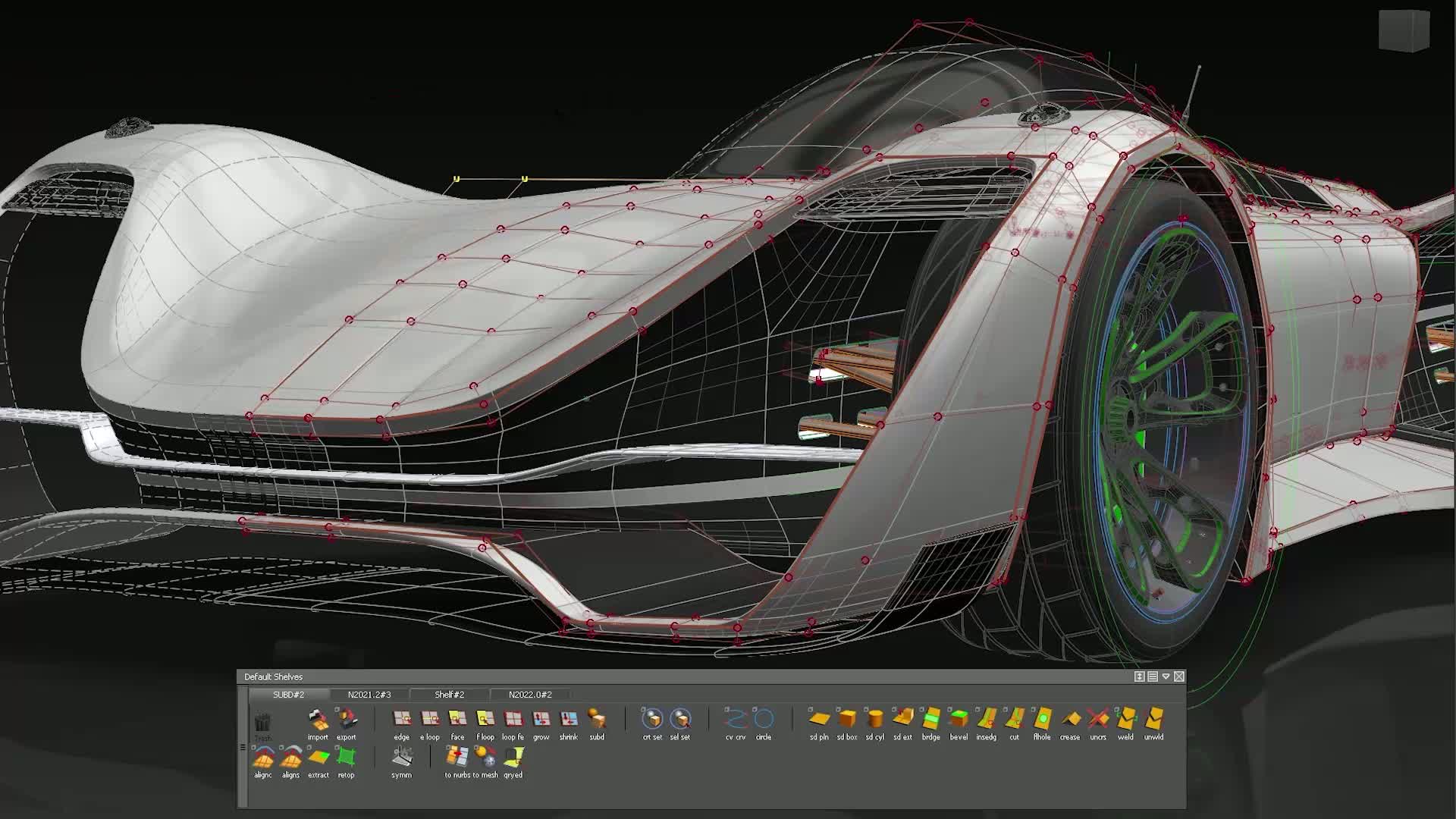
Concept modeling
Sketch and build subdivisional models tailored for product and automotive design, so early concepts hold their form as they develop.
Class-A surfacing
Refine concept geometry into technical surfaces with full construction history, at the quality level automotive and consumer product exteriors require.
Automated surfacing
Build clean surfaces from scanned point cloud or mesh data automatically, instead of rebuilding scanned geometry by hand.
Computational design
Generate production-quality, repeatable patterns from algorithm-based rules, and iterate a design direction without remodeling it each time.
Design in virtual reality
Review and adjust curve, surface, and subdivisional models in VR, at full scale, before a surface goes to production.
Assemblies and Flow Production Tracking
Alias and non-Alias modelers reference the same assembly and manage design review through Flow Production Tracking, without exporting between tools.
Key capabilities
- Concept to production, one pipeline: Move a design from first sketch through Class-A surface without switching tools or rebuilding geometry between design and engineering.
- Built for Class-A surfacing: Construct the smooth, reflection-quality surfaces automotive and consumer product exteriors need, with full construction history for later changes.
- Scan and mesh data made usable: Turn point cloud and mesh scans into clean, editable NURBS surfaces automatically, useful for reverse engineering and physical model capture.
- Three tiers matched to the work: Alias Concept, Alias Surface, and Alias AutoStudio scale from early sketching to full production surfacing, so you license what the role actually needs.
Is Alias right for your team?
| Best for | Industrial design, automotive styling, and Class-A surfacing from concept through production |
|---|---|
| Platforms | Windows 10 and Windows 11 desktop |
| Included | Alias Concept, Alias Surface, or Alias AutoStudio, with VR design and computational design tools |
| File format | Native .wire (NURBS), with STL, OBJ, and major CAD format import/export |
| Licensing | Annual or multi-year subscription, single-user or flex tokens |
| From DSI | Deployment help, certified training, and local technical support included |
A subscription is just the start
Buy Alias through DSI, an Autodesk Platinum Partner. Get deployment help, certified training, and support from specialists who use the software every day.

Frequently asked questions
What is Autodesk Alias used for?
Alias is industrial design and Class-A surfacing software, used for concept sketching, 3D modeling, and the reflection-quality surfacing behind automotive bodies and consumer product exteriors. It is a styling and surfacing tool, not an engineering-analysis package.
What is the difference between Alias Concept, Alias Surface, and Alias AutoStudio?
Alias Concept covers sketching, fast concept modeling, and visualization. Alias Surface adds the tools to refine those concepts into Class-A production surfaces. Alias AutoStudio covers the full pipeline, concept through production surfacing, in one license.
Does Alias replace AutoCAD or Inventor?
No. Alias is a styling and surfacing tool for the design phase, working in NURBS and subdivisional geometry. AutoCAD and Inventor handle drafting, documentation, and mechanical design once a surface is production-ready.
What file formats does Alias work with?
Alias saves natively to .wire, a NURBS-based format, and imports and exports STL, OBJ, and the major CAD formats used by downstream engineering and manufacturing teams.
Is Alias available for Mac?
No. Alias runs on Windows 10 and Windows 11 desktop only. If your studio is mixed-platform, plan Alias seats for Windows machines.
Get in touch with our team today!
Talk to a DSI specialist about Alias licensing, bundles, and training built around how your team works.